Criteria in Avicenna is a conditional expression, or formula, that instructs Avicenna whether an action should occur (or whether a study section should be shown or activated) based on the participant’s context, which eventually increases participant compliance rates.
Avicenna allows adding criteria to the following elements:
- Eligibility Surveys
- Activities
- Triggering Logics
- Survey Sections
- Survey Questions
- Notification Templates
Survey Criteria
Survey sections and questions can include criteria that control their visibility. Avicenna shows or skips a section or question based on whether its criteria evaluates to True or False.
[!note] Note
An eligibility survey must have a criteria. This criteria specifies who is considered eligible to join the study and who should be excluded.
Activity Criteria
Activities can have criteria that control whether they are available to a participant. Avicenna evaluates activity criteria whenever the condition or values of its parameter change. The activity must be prompted to the participant during its triggering time if the criteria is evaluated to True.
The criteria is not considered only when researchers manually release the activity.
Triggering Logic Criteria
Each TL can also have a criteria that determines whether it should be enabled. Similar to activity criteria, TL criteria is evaluated whenever the condition or values of its parameter change.
Notification Template Criteria
Notification templates can include criteria that controls when notifications are sent. Notifications associated with a template are triggered only when the template’s criteria evaluates to True.
By default, the criteria field for all components mentioned above is empty. In Avicenna, an empty criteria evaluates to True, meaning the component is active by default. If a criteria is not empty but contains a syntax error, Avicenna evaluates it to False.
[!info]
Only survey questions can be used in criteria; other sources, like cognitive tasks, are not supported.
Syntax
A criteria is composed of one or more conditions connected by logical operators such as AND, OR, and NOT, and may be grouped using parentheses. Conditions can include both positive and negative values. If the expression is properly constructed, the evaluation results in a Boolean value.
[!note]
When composing criteria in Avicenna, it is important to consider the order of evaluation. The system follows standard logical operator precedence: expressions in parentheses are evaluated first, followed byNOT, thenAND, and finallyOR. Parentheses can be used to override the default precedence, enabling more complex and precise criteria definitions.
You can combine multiple conditions using logical operators.
[!example] Basic AND Condition
Q58_31 == 0 AND Q58_20 > Q58_27In this example,
Q58_31 == 0andQ58_20 > Q58_27are the conditions, andANDis the logical operator that connects them.
Conditions may also include negative values and negated expressions.
[!example] Using NOT and Negative Values
Q58_31 == -10 AND NOT Q58_20 > -5In this example, the condition will be
Trueif the value ofQ58_31is-10and the value ofQ58_20is less than or equal to-5.
You can use parentheses to group conditions and build more complex logic.
[!example] Grouping Conditions with Parentheses
(Q58_31 == 0 AND Q58_20 > Q58_27) OR (Q58_31 == 1 AND Q58_20 < Q58_27)In this example, Avicenna first evaluates the left-side parentheses to
TrueorFalse, then moves to the right-side parentheses and evaluates that as well, and then combines the two withOR.
Negating a Condition
You can use NOT to negate the result of a condition. For example, if Q58_31 == 0 evaluates to True, then NOT Q58_31 == 0 evaluates to False.
You can also apply NOT directly to a question reference. In this case, NOT Q58_31 evaluates to True when Q58_31 has not been answered or when its response type is not supported by conditional expressions (e.g., images). Otherwise, it evaluates to False.
Operators
Each condition typically consists of three parts: a left operand, an operator, and a right operand. The operator compares the left and right operands and determines the result of the condition. Supported operators are listed below:
| Operator | Meaning |
|---|---|
> |
Greater than |
>= |
Greater than or equal to |
< |
Less than |
<= |
Less than or equal to |
== |
Equal |
!= |
Not equal |
Operands
Operands are tokens that Avicenna can interpret and convert to a number. An operand can be one of the following:
Question Reference
An operand can reference the response to a specific question in a survey. In this case, Avicenna always retrieves the most recent response to that question, converts it to a numeric value, and uses it for criteria evaluation.
A question reference operand must start with the letter Q, followed by two numbers that are separated by an underscore. The letter Q helps Avicenna understand that the operand refers to a question. The first number represents the survey ID and the second number represents the question ID that is referenced here.
Each survey has a unique, system-assigned ID, and each question has an ID that is unique within that survey. Therefore, the combination of survey ID and question ID always identifies the same question in the study. For example, the Q58_31 refers to question 31 of survey with ID 58.
When a criteria is defined within the same survey, a simplified syntax can be used. In this case, Qn may be used instead of Qm_n.
Only questions whose responses can be represented as numbers can be referenced in criteria. The following question types are supported:
- Number: the response is already a number.
- Mass: the response in metric will be used for evaluation.
- Length: the response in metric will be used for evaluation.
- Visual Analog Scale: the response is already a number.
- Single Answer: the ID of the selected answer will be used for evaluation.
- Multiple Answer: a set of numbers, containing the ID of all chosen answers will be used for evaluation.
The following question types cannot be referenced in criteria:
- Information
- Text
- Audio
- Image
- Video
- Audio/Text
- Barcode
- Calendar
[!note] Note
If a question of an unsupported type is referenced in a condition, that condition evaluates toFalse. However, the overall criteria may still evaluate toTruedepending on the other conditions.
[!note] Note
For multiple answer questions, only the!=and==operators can be used. Using any other operator causes the condition to evaluate toFalse. When using==or!=, the condition checks whether the other operand is included in the selected answers. If both operands reference multiple answer questions, they are considered equal only if the same set of answers was selected for both questions.
Invalid Question References
When Avicenna evaluates a question reference in a condition, it retrieves the latest response to that question and uses it for evaluation. If the question has not been answered yet, the retrieved value is null. Comparing null to any value evaluates to False.
For example, consider the criteria Q1_12 == 2, where Q1_12 refers to a number question. If, at the time of evaluation, the participant has not responded to question 12 of survey 1 yet, Q1_12 is null, and null == 2 evaluates to False.
Keyword
Avicenna supports a set of keywords that point to certain values related to the participation record. Supported keywords include:
_seconds_since_reg_time_minutes_since_reg_time_hours_since_reg_time_days_since_reg_time_weeks_since_reg_time_months_since_reg_time_years_since_reg_time_seconds_since_reg_date_minutes_since_reg_date_hours_since_reg_date_days_since_reg_date_weeks_since_reg_date_months_since_reg_date_years_since_reg_date
These values represent the amount of time that has passed since the participant’s registration date or registration time.
[!example] Example:
_hours_since_reg_time
_hours_since_reg_timerefers to the number of full hours that passed since the exact time the participant enrolled. If a participant joins the study at2020-11-07 20:15:07(local time) and the criteria is evaluated at2020-11-09 07:12:00, the duration between the two is34:56:53. Therefore_hours_since_reg_timewill be equal to34.
[!example]
Example: _weeks_since_reg_date
_weeks_since_reg_daterefers to the number of full weeks that have passed since the participant’s registration date. If a participant joins the study at2020-11-07 20:15:07(local time) and the Criteria is being evaluated at2020-12-09 07:12:00, Avicenna compares the evaluation time (2020-12-09 07:12:00) with the registration date (2020-11-07 00:00:00), which is4w 4d 07:12:00. Therefore_weeks_since_reg_datewill be equal to4.
[!note]Note
These keywords can be used only in criteria for Survey Sections and Survey Questions. When used in criteria for an Eligibility Survey, Activity, or Triggering Logic, they are always evaluated asFalse.
Setting a Criteria
In Avicenna, there are two ways to set a criteria for the various elements mentioned above:
-
Manual Typing (Typing mode):
- Users with a good understanding of the syntax can type out the criteria manually.
- This mode provides a text field where users can type in their criteria using the correct syntax.
-
Interactive mode:
- Users can construct criteria using a graphical interface that provides buttons and dropdown menus.
- This interface allows users to select questions, operators, and values from dropdown menus and buttons, making it easier to construct criteria without having to remember the exact syntax.
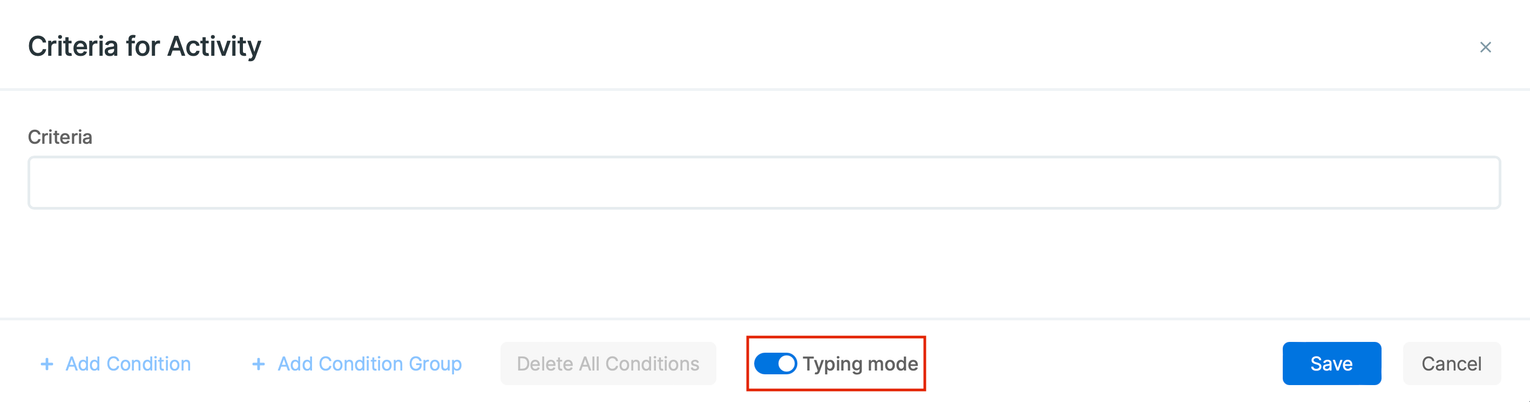
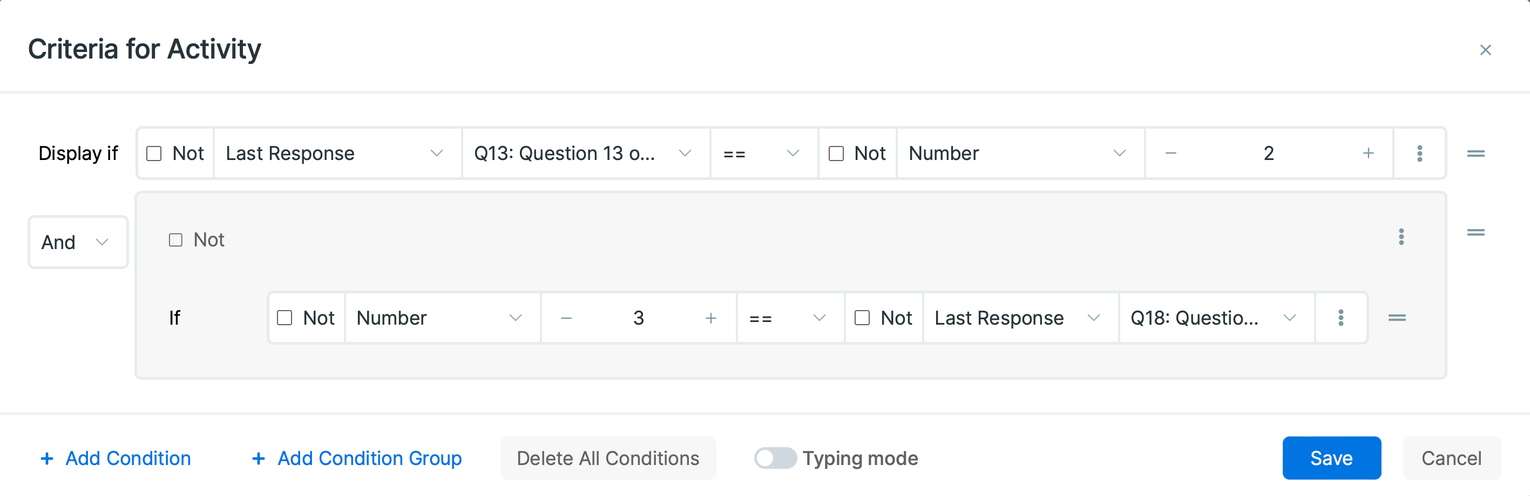
Both methods are designed to cater to different user preferences and levels of familiarity with Avicenna’s criteria syntax. The manual typing mode is more flexible and may be faster for experienced users, while the interactive mode provides a more guided and structured way of creating criteria, which may be more beneficial for newer or less technical users.
Condition Evaluation Examples
In order to evaluate a criteria, Avicenna breaks it into a set of conditions, evaluates each condition individually, and then combines them using logical connectives. This results in a single True or False value.
Assume your study contains a survey with ID 1, and the survey contains the following question IDs:
Q1_1: Single answer question. It contains three answers:Red (A ID: 1),Green (A ID: 2), andYellow (A ID: 3).Q1_2: Multiple answer question. It contains three answers:Red (A ID: 1),Green (A ID: 2), andYellow (A ID: 3).Q1_3: Number questionQ1_4: Length questionQ1_5: Mass questionQ1_6: Visual analog scale questionQ1_7: Another Multiple Answer question. It contains four answers:Red (A ID: 1),Green (A ID: 2),Yellow (A ID: 3), andBlue (A ID: 4).Q1_8: Text questionQ1_9: Audio questionQ1_10: Video questionQ1_11: Image questionQ1_12: Audio/Text questionQ1_13: Barcode questionQ1_14: Calendar questionQ1_15: Information question
The following table lists a set of example conditions, and explains how Avicenna evaluates each:
| Condition | Evaluation |
|---|---|
Q1_1 > 1 |
If the last response participant gave to Q1_1 is either Green or Yellow, the evaluation will be True, otherwise, it will be False. |
Q1_1 == Q1_3 |
If the number the participant entered for Q1_3 is the same as the ID she selected for Q1_1, True. Otherwise False. |
Q1_3 < Q1_1 |
If the number entered for Q1_3 is less than the ID of the answer chosen for Q1_1, True. Otherwise False. |
_days_since_reg_date == Q1_1 |
If the full days passed since the registration date is the same as the ID of the answer chosen for Q1_1 (either 1, 2, or 3), True. Otherwise False. |
Q1_1 == 1.5 |
This will be always False because the responses to Q1_1 are either 1, 2, or 3, and none of them is equal to 1.5. |
Q1_1 == Q1_2 |
This will be True if the ID of the response to Q1_1 is also chosen for Q1_2. For example, if Q1_1 is Red, as long as Red in Q1_2 is also selected, irrespective of other selected items for Q1_2, the evaluation is True. |
Q1_2 == 2 |
If Green is selected for Q1_2, irrespective of other selected items, will be evaluated as True. Otherwise False. |
Q2 == 2 |
This syntax can be used instead of the Q1_2 == 2 when you want to reference a question inside the current Survey. If Green is selected, will be evaluated as True. Otherwise False. |
Q1_2 == Q1_7 |
This compares the answer set for Q1_2 with the answer set for Q1_7. If they are identical, it evaluates to True. Otherwise False. |
Q1_2 > 1 |
Because of unsupported operators for Multiple Answer questions, this condition evaluates to False. |
Q1_2 == Q1_11 |
As Q1_11 is an Image question, this condition always evaluates to False. The result will also be False for any of the Q1_8 to Q1_15. |
Q1_8 <= 12 |
Same as above. Will always evaluate to False because Q1_8 is a Text question. |
NOT Q1_12 |
Always evaluates to True. That’s because Q1_12 always evaluates to False, and NOT will negate that to True. |
NOT(Q1_13 < 1) |
Same as above. This will always evaluate to True because it negates the result of Q1_13 < 1 which is always False. |
_days_since_reg_date > 5 |
True if the number of days that have passed since the participant registered is greater than 5. Otherwise False. |
_hours_since_reg_time < 12 |
True if the participant is in the first 12 hours of his participation. Otherwise False. |
1 == 1 |
Always True. |
2 != 1.1 |
Always True. |
Q1_3 < 0 |
Evaluates to True when the response to Q1_3 is a negative number. False otherwise. |
Q1_6 == -10 |
Is True only when the participant’s score on the VAS (Q1_6) is exactly -10. Otherwise, it is False. |
Q1_6 > -20 |
Becomes True if the participant’s score on the VAS (Q1_6) is greater than -20. In all other cases, it’s False. |
NOT Q1_6 > -5 |
True only when the participant’s score on the VAS (Q1_6) is less than or equal to -5. If not, the condition is False. |
Q1_3 < -10 AND Q1_6 > -20 |
This condition checks if the response to Q1_3 is less than -10 and the score on the VAS (Q1_6) is greater than -20. If both conditions are met, it’s True. If not, it’s False. |
Q1_5 == -1 |
Always evaluates to False as the response to a Mass question (Q1_5) cannot be a negative number. |
The criteria system in Avicenna is a robust and flexible framework that enables researchers and practitioners to define precise conditions for the execution of various elements within a study. By understanding the criteria syntax and evaluation logic, users can effectively tailor the behavior of eligibility surveys, activities, triggering logics, survey sections, and survey questions to meet the specific requirements of their studies. The examples provided illustrate how different types of conditions and logical connectives are evaluated, helping users construct and troubleshoot their criteria. As Avicenna continues to evolve, the criteria system will remain a core component in ensuring accurate and meaningful participant engagement.
For further assistance or questions, please contact our support team.